The Software Programming Experience of a Tech Lead
» Coding Savvy FB Twitter Google

How Floyd's Tortoise and the Hare Linked List Circle Detection Algorithm Works

There are many ways of storing data when writing a computer program especially when it's a group of data that share the same property. Like the data of students under the age of 12 or People who love same category of movies. This can be store as an array or a slice into the memory but sometime you just want some that is very simple to work with when the data get massively large to go through. Cases like this are when linked list comes to play. It essentially just a sequence elements where one element links to the next element.

How Floyd's Tortoise and the Hare Linked List Circle Detection Algorithm Works

Why You Still Need Antivirus and Internet Security Software in 2018

Technology has evolved rapidly since the last decade. If you think your devices is safe and secure enough to protect your data, I'm sorry to break it to you but you are wrong. You are more vulnerable than ever before. Its just that now you are blinded in lots of ways you hardly notice that something is not right. Computer viruses are now advanced, they only attack when necessary or when instructed to do so. More so, virus is no longer the only villain, there are hundreds of security-threatening software online seeking to exploit a fragile system. Even with Internet security software and anti-viruses, the best way to stay safe is to be conscious of what you are doing while online.
Why You Still Need Antivirus and Internet Security Software in 2018

Top 10 Software Development Roles That Makes More Money

Software development is becoming more wider and diverse as technology changes. Deciding what job-role to fill with respect to income is a bit puzzling for any individual.  Here, we'll examine the roles that pay the most in the industry, that is, roles that earn more money than others. It's worthy of note that not all software roles write codes and the complex mathematical computations.  As a matter of fact, research shows that the highest paying roles are more dependent on developer's experience. There are roles that only require the basic understanding of the technology stack and still pay more money than the more difficult roles. In this article, you'll find out how you can earn well working in a software development environment with or without the core coding skills.

Stream Videos with Low Server Resource and Gzip compression using NodeJS

Video streaming is more popular than it was a decade ago, More videos are played on Youtube, Netflix, and other online video streaming media. Netflix is the best example who leveraged the benefit of Node.js by implementing it for production and they achieved the tremendous result economically and in performance. Delivering almost 7 billion hours of videos to nearly 50 million customers in 60 countries per quarter. This tutorial will highlight how to efficiently stream video from a NodeJS server with less server resource and a compressed output to make it easier for browsers to download the content.
Stream Videos with Low Server Resource and Gzip compression using NodeJS

5 Ways to Make More Money as a Mobile App Developer

Mobile application development is a profession filled with potential income source. As a developer making money by building mobile applications can be used to improve personal income. Apart from your primary source, You can venture into various aspects of software development that can further earn more money. Here we are going to expose 5 different ways of making more money as a mobile app developer.
5 Ways to Make More Money as a Mobile App Developer

8 Simple Ways to Speed up React Native Apps to Make it Faster

"A compelling reason for using React Native instead of WebView-based tools is to achieve 60 frames per second and a native look and feel to your apps." Performance issues in React Native apps have been noticeable to developers, Even though the React Native team is trying their best, Most of these have to do with React itself and how it works. Rendering at 60FPS (Frame Per Seconds) is possible but due to some unethical coding style can make state and render very very expensive, Rendering and loading of assets can draw back React Native app Speed, Overall app performance will also take some hit. We are going to look into 8 simple ways we can increase the speed of React Native application, These are derived from what other developers have done and my experience with React Native.
8 Simple Ways to Speed up React Native Apps to Make it Faster

Flutter vs React Native : What You Need to Know Before Diving

About a Decayed ago, smartphones were not widely used. Since then, smartphones have become an essential tool to browse our everyday lives, Mobile Apps are the tools that made it so. Mobile app development has evolved, Since the last decayed, Ways of developing a mobile application has taken a new shape. Developers want to be more efficient without compromising on speed and performance, We want to ship code more quickly by leveraging on cross-platform nature.
Flutter vs React Native : What You Need to Know Before Diving 2018

React Native Navigation v2 with Redux and Google Analytics

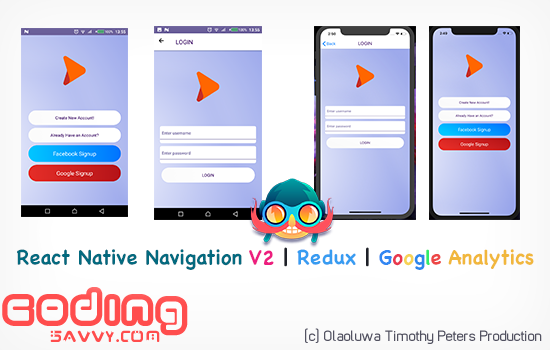
Navigation is one of the core aspects of Mobile app development, With the right navigation module your app will have the native look and feel it deserves. There are lots of Navigation Modules for React-Native out there but most of them are built on JavaScript, JavaScript base Navigations are only trying to fake the native navigation but you can get the real native navigation performance with the look and feel by using React Native Navigation for your Android and iOS app. React Native Navigation is written in native codes to give the best performance and the same look and feel you will get on a native mobile application. In this tutorial, we are using React Native Navigation with Redux and React Native Google Analytics Bridge. Redux and Google Analytics Bridge are just and added the bonus to our app, We use Redux to maintain our app state then we will use Google Analytics Bridge to Track our app and receive detailed usage information from the app.
React Native Navigation v2 with Redux and Google Analytics

Quick and Fast Image Loading on Android and iOS with React-Native

On this version of React-Native Tutorial we are going to look into how to load Images Quick, Fast and Easy with React-Native Module React-Native Fast Image, We are also going to add a little animation using React-Native Image Progress Module to allow users know when image loading is in progress and when it's completed. There are three Major modules Involve in this Project that is written by Trusted React-Native Developers and backed by the great community. The main Objective of this Project is to see how we can avoid loading Images twice on Android and iOS each time our app is launched therefore saving us some bandwidth data, React-Native Fast Image does this by caching the images that have been loaded by the app. As stated on the Repo, FastImage is a wrapper around SDWebImage (iOS) and Glide (Android), These are two powerful and efficient image caching libraries on Android and iOS platform.
Quick and Fast Image Loading on Android and iOS with React-Native

Building Android and iOS Apps with React-Native in 5 Minutes.

If you haven't read the previous post, Then head straight for it here,  Why I Moved from Ionic to React-Native for Android and iOS Development, It will help you understand and appreciate the simplicity and the reason Framework matter in Mobile app development.
Now, We will design a mobile app for Android and iOS with React-Native in 5 Minutes. This app will run on both Android and iOS Devices, As go further in React-Native tutorial series, The magic in React-Native will reveal itself. We will demonstrate how to earnest the power of native module to create a robust Android and iOS app using React-Native.

Building Android and iOS Apps with React-Native in 5 Minutes.

Why I Moved from Ionic to React-Native for Android and iOS Development

Ionic has been my preferred for cross-platform mobile application development framework for about 2 years in a row, But lately, the most project I have work on is built with React-Native, I was a big fan of react but I haven't really looked into React-Native until recently. I love Ionic Framework a lot, Many can tell from my previous posts but there are just some projects that you really want to have access to the native APIs with ease and React-Native kind of provide that bridge out of the box. In this Blog post, I will explain my experience with Ionic Framework and why I switched to React-Native on my recent project and also share my opinion whether a beginner should start with Ionic Framework or just go directly to React-Native.
Why I Moved from Ionic to React-Native for Android and iOS Development

Build your first Ionic 3 Mobile App, Detailed Beginner's Guide

Ionic is the Leading Cross-Platform development framework. Ionic let you build Mobile application for Android, iOS and Windows with just a single codebase.
The first issue that beginner's have when they want to build an Ionic App is that they don't have previous experience with the technologies behind the Ionic Stack.
Ionic 3 uses Angular, Typescript and HTML5 for it main components.
The first two stack technologies are both based on javascript.
Therefore, To truly understand this tutorial you should be able to write basic JavaScript. You are expected to understand functions, Objects, arrays and variable declarations.

Why Ionic Framework is Leading Cross-Platform Development Stack

Ionic Framework is a mobile app stack that let web developers build apps for all major app stores and the web with a single code base. At the same time, your app looks and feels awesome on every device, Isn't that great?
In fact , All you need to know is Angular, JavaScript, Typescript and HTML5.
Arguably, All these are things you can learn through a normal weekend if your'e a newbie.
Above all, Ionic Framework makes it easy for web developers to build mobile and web apps for Android, Windows, IOS, Electron and Browser without stress.
Why Ionic Framework is Leading Cross-Platform Development Stack

Apple-1 PC hand-built by Steve Wozniak and Steve Jobs in 1976 sold for $355,000

Who could imagine such a machine still exists and it's still working, A working 1976 Apple-1 Personal Computer was sold for $355,000 last week in an auction hosted by Christie's New York. This is the first Apple's Personal Computer, This particular version was hand-built by Steve Wozniak and Steve Jobs in the confines of Steve Jobs' garage. A similar version of this 1976 PC is sold for $671,400 in 2013 and $905,000 in 2014, This makes $355,000 sales the cheapest Apple-1 sales till date, It comes without a casing and power supply, it's the first to have its own motherboard, which set it apart from competitors. Apple-1's success at the time is credited as the force that catapulted Apple into the personal computing industry. The Apple-1 originally retailed for $666.66, and now only 66 computers still exist. Sound like a coincidence? Maybe!
First Apple Computer hand-built by Steve Wozniak and Steve Jobs in 1976 sold for $355,000 - still working

Meet Bixby Samsung New Voice Assistant

Bixby digital assistant was absent from the initial release of Samsung Galaxy S8, Samsung promised would be coming at a later date. On the 1st of May, 2017, Bixby was released for S8 and S8 Plus owners in South Korea. Before now, S8 owners have the ability to use Bixby features like Vision augmented reality, Bixby Home, and Reminders features since launch. But the full voice control recognizes the major selling point of the new virtual assistant, which Samsung claims will allow users to accomplish anything they could do with regular touch controls through voice commands. The English version was delayed due to the company’s difficulty in optimizing it for English commands- according to report, Samsung has announced that S8 and S8 Plus owners can test Bixby’s voice features before anyone else.
Meet Bixby Samsung New Voice Assistant

Facebook Using over 150 People and Artificial Intelligence For Counter-Terrorism

Recent Announcement by Facebook that most accounts removed for terrorism-related activity are uncovered by the company itself, and that it’s using artificial intelligence to find more threats. People have questioned the role of tech companies in fighting terrorism online, Facebook is using image-matching for terrorist photos and videos, and detecting “clusters,” where terrorist content is posted across related accounts. We want to find terrorist content immediately, before people in our community have seen it. Already, the majority of accounts we remove for terrorism we find ourselves. But we know we can do better at using technology — and specifically artificial intelligence — to stop the spread of terrorist content on Facebook
Facebook Using over 150 People and Artificial Intelligence For Counter-Terrorism

Smart Keyboard that Reads Fingerprints by Microsoft

New smart Keyboard that reads Fingerprint unveiled by the tech giant Microsoft is the latest keyboard in town, With maximum security guaranteed, Microsoft has turned you to your own password. The Modern Keyboard is the successor to the Surface Keyboard, and looks identical. The only changes are a new fingerprint reader and the ability to use a cable for a wired connection instead of wireless. This super brilliant Keyboard can be used to log into Windows 10 or websites using Windows Hello. The new Modern Keyboard will work with Windows 10, MacOS, and the latest versions of Android.

Killer Tips to Improve Website PageSpeed Performance and Optimization

PageSpeed is the amount of time it took web server to respond to the requests of the browser and how long it takes for it to serve all page Resource(Images, Audio, Videos, Flash Animations, e.t.c.), Content (HTML, CSS and Texts) and Meta Information (HTTP info i.e Author, Content-Type, e.t.c) to be fully downloaded and rendered by the web browser. Modern browsers have been optimized to handle page loading efficiently with time, They do have their own drawbacks but not as expensive as a slow webpage. A slowly loading webpage is not good for user experience, most users just click away or close the tab before the loading completes, These can make any potential buyer leave before the get to see any product on the website. PageSpeed improvement is a way of gaining more power above market competitors, People can browse through contents faster, make payments and review / comments. It encourage them so browse around more categories and purchase more items.
Killer Tips to Improve Website PageSpeed Performance and Optimization

Getting started with Google Material Design ( Materialize ) an HTML5 Responsive Framework

Google Materialize is a CSS framework but the special thing about this powerful library is that it gives your page the look and feel of material properties(colors, typography, shapes, patterns and layout). If you have ever come across any Material Design CSS you will understand what Google is trying to archive by creating this powerful library. Materialize has it own unique characteristics( Motion and Stacking ) which is why developers don't see it as another Twitter Bootstrap duplicate, It follows Google Material Design Documentation.
Material Design is a design language that combines the classic principles of successful design along with innovation and technology.:
We want to create a visual language that synthesizes classic principles of good design with the innovation and possibility of technology and science.  Google's goal is to develop a system of design that allows for a unified user experience across all their products on any platform.
Materialize is the web implementation of Material Design to web which was initially made by Google for Android.
Programming Languages and Frameworks used to build Top Nigeria Websites

Programming Languages and Frameworks used to build Top Nigeria Websites.

Nigeria websites are programmed using different languages and frameworks from Education, E-commerce, News, Music & Entertainment, Sports Betting & Updates and Banking are the top most popular websites in Nigeria. Some scale well but I believe scalability has to do with the code and the database structure, This are what most visited websites fail to implement which added to the bounce rate and reduce active user capacity. All this is due to the Developers and the maintenance team of the project. I have decide to take some time out and do a research on which framework / programming languages the most popular websites in Nigeria are using and how do they affect their performance and capacity. Let choose a couple of popular Websites in Nigeria we are going to be reviewing.
Programming Languages and Frameworks used to build Top Nigeria Websites